*본 글은 Gemini를 활용하여 작성하였습니다.
*'단일페이지' 기능은 서버나 호스팅 없이, 특정 도메인 주소에 접속했을 때 보여줄 간단한 공지나 페이지를 한 페이지로 보여주는 기능을 말한다. 그러면 Gemini를 이용해 안내 페이지를 하나 만들어 보자.
(1) 다음과 같은 단일 페이지용 HTML 코드를 작성한다. 여기서 블로그 주소와 이메일 주소를 수정한다.
|
<!DOCTYPE html>
<html lang="ko">
<head>
<meta charset="UTF-8">
<meta name="viewport" content="width=device-width, initial-scale=1.0">
<title>환영합니다</title>
<style>
body { font-family: 'Apple SD Gothic Neo', sans-serif; background-color: #f5f7fa; display: flex; justify-content: center; align-items: center; height: 100vh; margin: 0; color: #333; }
.container { text-align: center; background: white; padding: 40px; border-radius: 20px; box-shadow: 0 10px 25px rgba(0,0,0,0.05); width: 90%; max-width: 400px; }
h1 { font-size: 24px; margin-bottom: 10px; color: #2d3436; }
p { font-size: 16px; color: #636e72; line-height: 1.6; margin-bottom: 30px; }
.links a { display: block; text-decoration: none; background: #0984e3; color: white; padding: 12px; border-radius: 10px; margin-bottom: 10px; transition: 0.3s; font-weight: bold; }
.links a:hover { background: #74b9ff; transform: translateY(-2px); }
.footer { font-size: 12px; color: #b2bec3; margin-top: 20px; }
</style>
</head>
<body>
<div class="container">
<h1>홈페이지 준비 중입니다</h1>
<p>현재 새로운 모습으로 단장하고 있습니다.<br>궁금한 점은 아래로 문의해 주세요.</p>
<div class="links">
<a href="mailto:이메일@주소.com">이메일 보내기</a>
</div>
<div class="footer">
© 2024 My Domain. All rights reserved.
</div>
</div>
</body>
</html>
|
(2) '내도메인.한국' 홈페이지를 방문한다.
(3) '단일페이지'에 접속할 도메인 주소를 입력하고 HTML 코드를 붙여넣기 한다. 여기서는 도메인 주소를 임시로test.swkoo.p-e.kr 로 설정하였다.
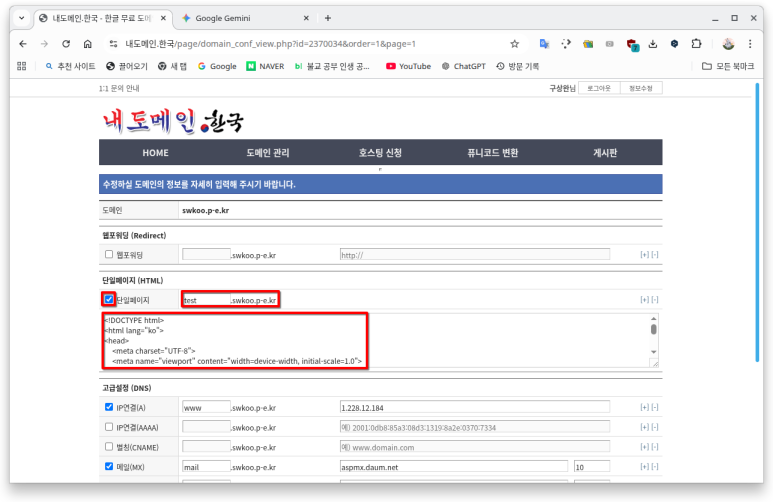
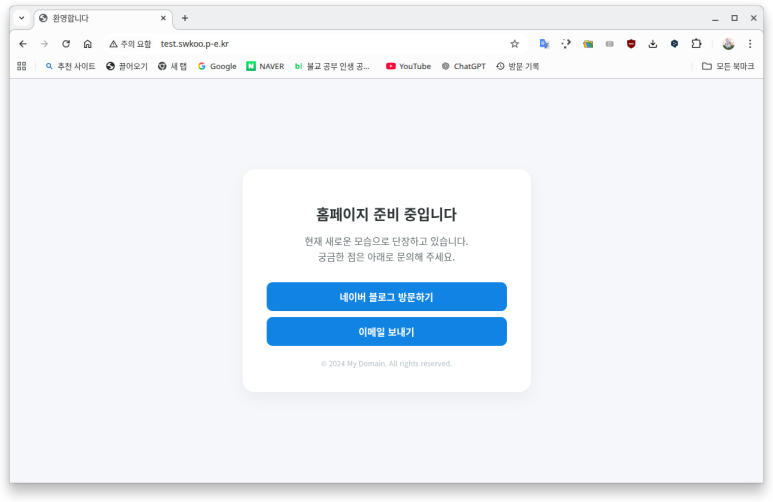
(4) 웹브라우저의 주소줄에 test.swkoo.p-e.kr 를 입력하면 다음과 같은 안내 페이지가 뜨는 것을 확인할 수 있다.
'워드프레스' 카테고리의 다른 글
| Docker로 로컬 PC에 워드프레스 환경을 만들자 (0) | 2026.03.12 |
|---|---|
| 다음 스마트워크로 무료 커스텀 이메일 주소를 설정하기 (0) | 2026.03.12 |
| 쿠분투(Kubuntu)에 메일서버를 설정하기 (0) | 2026.01.28 |
| 워드프레스 테마의 글꼴을 변경하기 (0) | 2026.01.28 |
| 워드프레스에서 테마 업로드시 파일 사이즈 제한을 변경하는 방법 (0) | 2026.01.28 |